
Project at a Glance
IsuruGeo is a custom operations platform designed for Isuru Distribution. It replaces fragmented paper records, phone-based coordination and disconnected spreadsheets with a centralized environment for sales, delivery, inventory, customers, credit collections, payments, returns and reporting.
The platform connects office managers with field workers, streamlining the order lifecycle and providing immediate visibility into commercial operations. In this case study, I walk through how I analyzed these manual operations, designed the role-specific experience, and developed the frontend system.
Disconnected operations
Orders, payments, stock, customer credits and employee activities were managed across paper records, messages and separate spreadsheets.
One role-based platform
I designed and developed connected workflows covering customer visits, invoice creation, delivery completion, payment collection and management reporting.
Shared source of truth
The platform improves workflow visibility, reduces repeated administrative work and creates clearer accountability across business roles.
Understanding the Business
Isuru Distribution is a regional food and beverage distribution business supplying fruit nectar, sweets and snack products to retail shops across selected areas of Southern Sri Lanka.
The business coordinates multiple activities to fulfill orders and collect payments. The daily operations follow a clear flow, which I mapped to ensure the platform accommodates every step in the lifecycle:
-
01
Shop Visit: Sales representatives visit retail shops on assigned routes to secure customer orders.
-
02
Invoice Creation: Orders are recorded as invoices, which can require immediate delivery or scheduled delivery.
-
03
Delivery Assignment: Scheduled orders are loaded and assigned to delivery vehicles.
-
04
Delivery Outcome: Delivery staff complete assigned deliveries and record delivery outcomes (e.g. full delivery, partial delivery, or rejection).
-
05
Payment or Credit: Customers pay in cash or bank transfer, or use credit arrangements for authorized shops.
-
06
Inventory & Reporting: Outstanding balances, inventory, stock adjustments, and sales reports are updated for management.
Shop Visit
Field order check
Invoice Create
Quantities & price
Assignment
Vehicle loading
Delivery Outcome
Drop variations
Payment/Credit
Outstanding update
Inventory & KPI
Report summaries
The Operational Problem
The business lacked a centralized system capable of connecting sales, delivery, inventory, credit and reporting workflows. This manual method created distinct operational friction points:
1. Disconnected information
Customer, invoice, stock, payment and employee information existed across separate paper records, causing delays in validation.
2. Limited real-time visibility
Management could not quickly determine which invoices were pending, delivered, partially delivered, rejected or awaiting collection, leading to dispatch delays.
3. Delivery communication gaps
Delivery assignments and outcomes (such as shortages or customer rejections) depended heavily on verbal instructions and message exchanges.
4. Credit collection difficulty
Partial payments, outstanding balances, and customer credit limits were difficult to track accurately over time, risking uncollected debts.
5. Inventory inconsistencies
Stock additions, sales deductions, shortages and product returns were not connected through one reliable workflow, resulting in stock-outs.
6. Mobile usability requirements
Field sales and delivery users needed fast, large-button interfaces that could be operated reliably on mobile viewports while travelling or inside retail shops.
Designing for Distinct Operational Roles
The system serves users with significantly different goals, devices and levels of operational responsibility. Rather than creating a single dashboard, I mapped out specific roles:
1. Administrators
Desktop & Tablet- Business-wide operational visibility
- Invoice validation and inventory updates
- Customer credit monitoring & reporting
- Employee performance and attendance tracking
2. Sales Representatives
Mobile Web- Fast customer search and routing lists
- Mobile order invoicing during shop visits
- Real-time stock catalog and pricing visibility
- Personal sales target tracking
3. Delivery Staff
Mobile Web- Clear checklists of assigned routing stops
- One-click delivery confirmation (full/partial/reject)
- Payment collection (cash/checks) logging
- Returns and damaged stock logs
4. Business Owners / Managers
Desktop & Mobile- Sales and profitability overview charts
- Outstanding customer credit summaries
- Driver route efficiency reports
- Risk identification and inventory health
Research and Discovery
I conducted discovery by observing sales and delivery routes firsthand in the Southern Province, mapping the manual lifecycle of an invoice to convert paper processes into digital states. This observation yielded six key insights that directly informed the design:
Field workers operate under direct sunlight, requiring larger touch actions (min 48px) and high-contrast visual indicators.
Delivery and payment states can change separately (e.g. an order can be fully delivered but marked as pending payment on credit).
FMCG products are cataloged and sold in bulk packs (cases) as well as individual units, necessitating side-by-side input fields.
Special client discounts require representatives to override standard list prices, needing structured permission inputs.
If the master catalog price changes in the future, old invoices must preserve the exact price at which they were sold.
Once deliveries are confirmed, records must be locked from editing to prevent auditing inconsistencies between dispatchers and drivers.
Structuring a Multi-Role Platform
Instead of exposing every function to every user, the platform uses role-specific modules and navigation. This is supported by a shared data layer:
Administrator
- Dashboard Overview
- Invoices & Catalog
- Inventory Manager
- Customers & Routes
- Payments & Credit Ledger
- Returns & Damage Logs
- Attendance & Payroll
- Users & Roles
Sales Representative
- Sales Dashboard
- Create Invoice Form
- Customer Directories
- Assigned Route List
- Personal Invoice Log
- Sales Target Tracker
- Attendance Logging
Delivery Staff
- Today Summary Card
- Assigned Route Deliveries
- Pending Deliveries Queue
- Credit & Collection Due
- Completed Deliveries Log
- Payment Entry Fields
PostgreSQL database tables containing customers, inventory catalogs, routes, invoice items, and payment transactions under unified Row Level Security policies.
Custom React authentication state router that checks user role attributes and dynamically loads the permitted panel shell (Admin, Sales, or Delivery).
Optimized UI panels built using shared Tailwind CSS component styles, rendering heavy layouts on desktop and task-focused cards on mobile viewports.
Connecting the Order Lifecycle
The order lifecycle connects the office administrators with field sales and delivery crews through six operational steps:
Operational data setup
Administrators create products, routes, shops, and allocate them to routes and sales reps.
Create sales invoice
Sales representatives select shops, products, pack/unit quantities, pricing overrides and delivery schedules.
Assign scheduled delivery
Invoices with future delivery dates are flagged and grouped into route runs for the dispatch vehicles.
Record delivery outcome
Delivery crews confirm item drops. The driver logs full deliveries, partial drop items, or shop rejections.
Record payment / credit
Crews log cash/check collections or route credit entries, automatically adjusting invoice outstanding balances.
Update inventory & visibility
Stock levels are automatically deducted, credits are logged, and financial reports reflect operations.
Key UX and Product Decisions
Each module of the platform was shaped by field observations to accommodate operational real-world conditions:
Problem: Exposing administrative modules (such as payroll, credit limits, pricing configurations) to field workers created unnecessary visual clutter, cognitive overload, and security risks.
Decision: Restructured the UI shell into three distinct modules based on user authorization, presenting role-specific actions immediately upon login.
Result: Reduced interface complexity and protected sensitive back-office data from unauthorised field access.
Problem: FMCG products (sweets, soft drink cases) are sold as complete boxes (packs) as well as individual pieces. Standard single-quantity fields forced reps to calculate fractions manually, resulting in billing calculation mistakes.
Decision: Configured side-by-side inputs (Packs and Units) directly in the product order rows with automatic inline calculations.
Result: Representatives can input order requests exactly as specified by store owners, eliminating mental math errors.
Problem: Invoices can require immediate drop delivery (where cash is paid at once) or scheduled future delivery (where cash is collected later). Showing payment forms for all invoices crowded the mobile page layout.
Decision: Applied progressive disclosure rules in the mobile creation form to hide payment fields entirely when "Deliver Later" is selected.
Result: Streamlined the invoice creation process, minimizing unnecessary fields and reducing vertical scrolling for reps in retail outlets.
Problem: Catalog pricing configurations change frequently based on manufacturer updates. Referencing a global product table for old invoices caused historical sales data to change retrospectively.
Decision: Configured a relational database trigger to copy and store the final selling price directly into each individual invoice item row during creation.
Result: Ensured that old commercial transaction receipts stay historically accurate, even after catalog updates.
Problem: If a delivery is marked completed but a back-office staff alters invoice items accidentally, audit checks on warehouse drops fail, causing discrepancies.
Decision: Enforced state-based rules where once an order is marked as "Delivered" or "Completed", the items are locked from direct editing. Corrective changes must be logged through returns or partial collection transactions.
Result: Improved the integrity of corporate transaction ledgers.
Problem: Drivers and delivery crews struggled to navigate raw database lists of hundreds of invoices, leading to skipped deliveries and route confusion.
Decision: Organized work queues into simple task-based tabs: "Assigned" (today's runs), "Pending" (scheduled or delayed), "Due Collections" (credit collections), and "Delivered" (history).
Result: Enabled delivery crews to scan and check off tasks sequentially from their mobile devices.
Different Interfaces for Office and Field Work
The platform relies on a single shared codebase but renders drastically different interfaces to accommodate different settings: desktop screens in the warehouse office, and mobile screens on the field.
Desktop Administration
- Persistent sidebar navigation for fast modules toggle
- Detailed double-column dashboard summaries
- Wide report tables with sorting, filtering, and exports
- A4 printer layout configuration with print previews
Mobile Field Operations
- Compact sticky header and bottom task navbar
- Single-column scrollable forms with optimized inputs
- Large 48px tap targets for easy use on the move
- Card-based delivery checkoff status listings
Accessibility Considerations (WCAG AA Compliance)
- Typography sizing: Minimum font size is enforced at 16px on mobile viewports to ensure outdoor legibility.
- Input spacing: Form elements use explicit labels and a minimum of 8px spacing to prevent accidental mis-taps.
- Status labels: Completed, delivered, and credit balances do not rely on color coding alone, adding clear textual flags (e.g. [Paid], [Delivered]).
- Error indicators: Validation error messages appear directly adjacent to affected forms instead of general popup alerts.
Designing with Implementation in Mind
The application uses a React and Vite frontend connected to Supabase for authentication, relational data storage and role-based access control. Vercel is used for deployment.
Frontend UI Architecture
- React Router role-based route protection
- Modular Tailwind theme layout shells
- Reusable form input widgets and table lists
- Print preview CSS and layout overrides
Backend & Storage Integration
- Supabase email authentication credentials
- PostgreSQL relational table schema mappings
- Row Level Security (RLS) policies by user role
- Trigger functions to sync catalog price copies
Show Technical Database Entity Relations & Rules
To preserve data integrity, we set up relational constraints in PostgreSQL:
- Invoices & Items: One invoice can reference multiple invoice line items.
- Invoices & Payments: One invoice can accommodate multiple payment transactions over time (supporting partial payments).
- Customers & Invoices: One customer shop can have multiple historical invoices.
- Routes & Customers: One route profile can contain multiple shop destinations.
- Catalog sync: Price overrides are allowed on creation, but final sold values are duplicated onto the line item, preserving historical transactions.
Challenges, Testing and Iteration
Development was driven by testing in operational settings. During testing with reps and drivers, we encountered challenges that required workflow iterations:
Design Iterations
Before: The invoice creation form required extensive scrolling before the primary action button became visible on small mobile screens.
After: Reorganized form inputs and compressed margins to display key billing options and the primary "Create Invoice" button above the fold.
Before: Mobile bottom navigation bar overlapped primary action buttons inside forms, causing accidental click routing.
After: Adjusted bottom layout padding and repositioned page-level actions inside forms to prevent navigation overlaps.
Before: Product catalog images occupied excessive space in item list grids on smaller phone screens.
After: Replaced large lists with compact product rows, offering small image overlays only on demand.
Before: Print layouts contained excessive white space, printing a single small invoice across multiple paper sheets.
After: Refined CSS print styles to compact layouts and fit exactly two invoices side by side on a standard A4 page run.
Validation & Testing Methods
Outcomes and Business Impact
Because verified quantitative production metrics have not yet been added, the outcomes of the platform are qualitative. The connected system has introduced visible improvements:
Management can review invoice, route, and delivery statuses directly from the database, eliminating verbal updates.
Payments, credit sales, and outstanding balances are tracked at the invoice level, making ledger audits straightforward.
Sales representatives and delivery crews receive simple, task-focused mobile panels that speed up shop visits.
All entries and state modifications are tied directly to authenticated user profiles and permission roles.
Completed commercial records and billing prices are preserved accurately against catalog updates.
The system's modular architecture supports additional products, routing paths, shops, and staff profiles.
Selected Interface Gallery
Explore the modular components designed for both administration and field routing:
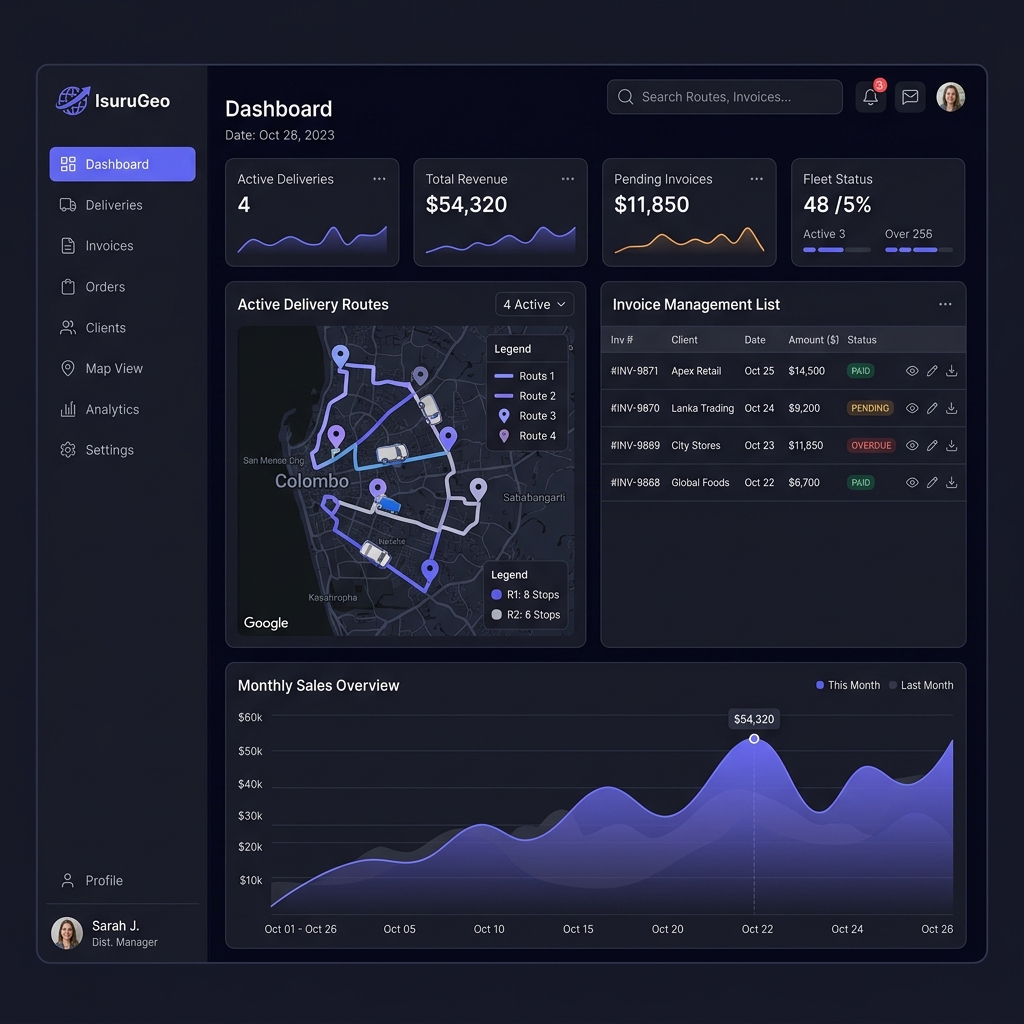
Sales, invoice, collection and operational summaries.
Daily sales activities and target visibility for field representatives.
Customer selection, product entry, pack and unit quantities, pricing and delivery timing.
Assigned orders, delivery outcomes and payment collection.
Structured review and print layout for commercial records.
Filterable sales, delivery, payment and operational reports.
Reflections and Key Learnings
-
•
Business software must support operational exceptions
A simple happy path is insufficient when deliveries, payments and stock can each be partial, delayed or rejected. Interfaces must support edge cases gracefully.
-
•
Mobile usability is an operational requirement
Small interaction problems compound when employees repeat the same workflow throughout the working day under heat and sunlight. Optimization saves time and improves adoption.
-
•
Financial records require historical consistency
Catalog price lists fluctuate, but completed invoices must lock and store sold rates as standalone records to preserve auditing compliance.
-
•
Role-based simplicity improves adoption
Hiding advanced administrative panels from delivery personnel lets them focus solely on checkoff queues, reducing training overhead.
-
•
Continuous stakeholder feedback improves the product
Valuable spacing improvements and print layout margins emerged only after shadowing delivery drivers on real routes.
IsuruGeo demonstrates my ability to combine workflow analysis, product thinking, UI/UX design and frontend development to address a real operational problem.
Continuous Product Development
Role shells, customer lists, invoicing inputs, and Supabase integration.
Inventory controls, returns logging, print layout updates, and attendance sheets.
Offline sync databases, route optimization maps, thermal receipts, and alert triggers.
Role shells, customer lists, invoicing inputs, and Supabase integration.
Inventory controls, returns logging, print layout updates, and attendance sheets.
Offline sync databases, route optimization maps, thermal receipts, and alert triggers.
Designing Digital Products Around Real Business Workflows
This project demonstrates how I combine business analysis, role-based product design, responsive interfaces and frontend implementation to solve complex operational problems.
Note: The production application is private because it contains real business and operational data.